How to sign up on Bitget: account, KYC and futures
You can open a Bitget account with an email or phone number in about 3 minutes. Before trading futures you also need to verify your identity and move USDT into the futures account. This guide follows Bitget's own help center step by step, then works out the fees and funding on a first trade.
Before you start
- An email address or phone number (pick one at sign-up; you can link the other later).
- A valid ID of your own: national ID, passport, driver's licence or residence permit, plus a face scan.
- You must be 18 or older, and each person may hold only 1 main account.
- Check that Bitget serves your country. Its terms exclude, among others, the US, Canada, France, Germany, Austria, Hong Kong, Japan, Singapore, Malaysia, Thailand and Russia (see the latest terms of use).
Step 1: open the sign-up page
Open the Bitget sign-up page in a browser, or install the app and tap Sign Up. The button below opens it with our referral code already applied.
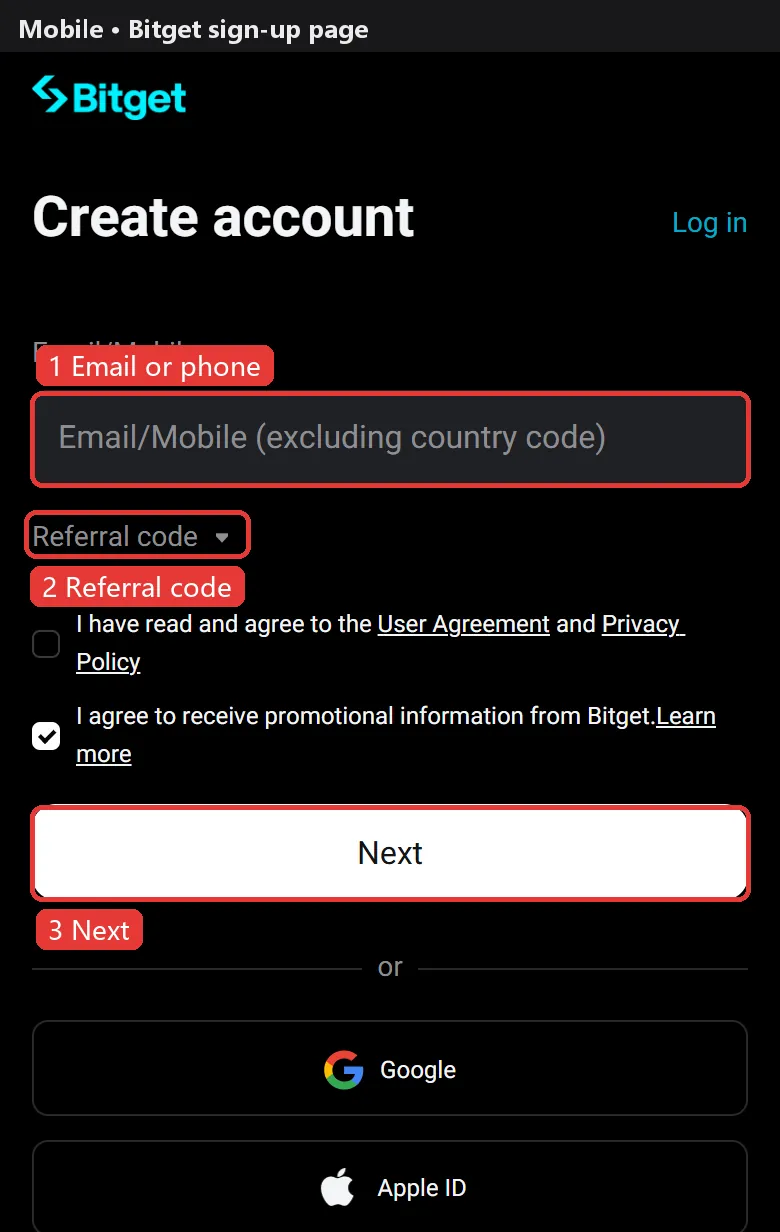
Step 2: enter email or phone, password and referral code
Choose Email or Mobile and enter it (pick the country code separately; don't type it into the number).
Expand Referral code and enter it (optional). Do it now: Bitget's help center does not say a code can be added later.
Accept the terms, tap Next and set a password of 8–32 characters with at least 1 number, 1 capital letter and 1 symbol. A slider or puzzle check follows.
Google, Apple and Telegram sign-up also work; identity verification is still required afterwards.
Step 3: enter the verification code
Enter the 6-digit code sent to your email or phone and submit. Your account is created.
No SMS? You can resend every 120 seconds, up to 3 times. No email? Check spam, whitelist Bitget's sender address and wait 15 minutes.
Step 4: verify your identity
Without identity verification Bitget does not allow deposits, trading, withdrawals or P2P. Level 1 is enough for individuals: upload both sides of your ID and complete a liveness face check; occasionally a proof of address from the last 3 months is requested.
Most reviews finish within minutes and usually within an hour. Glare, cut-off corners and a name that doesn't match are the usual reasons for rejection.
| Level | What you need | What it unlocks |
|---|---|---|
| Level 1 | ID + face check | Deposits, trading, withdrawals up to 3M USDT per 24h at VIP0 |
Step 5: secure your account
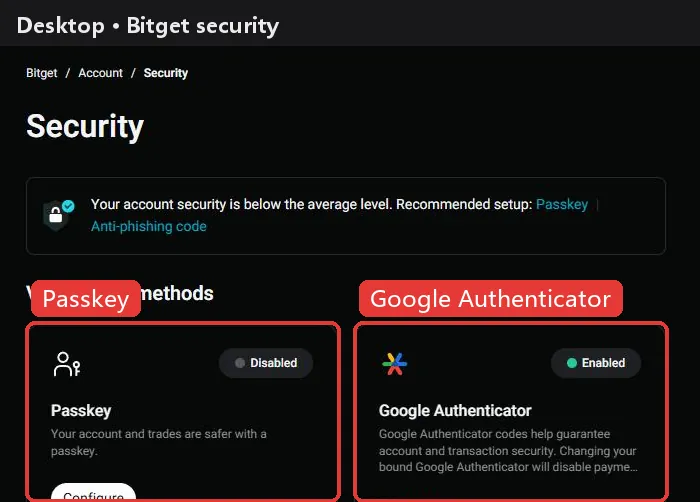
In the Security Center turn on Google Authenticator (2FA), a passkey, an anti-phishing code (real Bitget emails include it; anything without it is fake) and the withdrawal whitelist, so funds can only go to addresses you approved.
Step 6: deposit USDT
USDT perpetuals use USDT as margin. The usual way in is an on-chain transfer from another exchange or wallet: on Bitget tap Deposit, choose USDT and a network (such as TRC20, ERC20 or BEP20), copy the address, then send from the other side on the same network. A wrong network can mean lost funds, so try a small amount first.
Bitget also sells USDT by card or P2P, depending on your region.
Step 7: open futures and place a first order
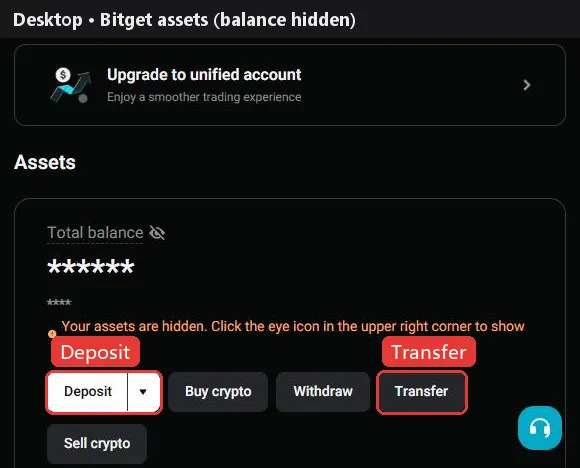
- In Assets tap Transfer and move USDT from Spot to the USDT-M futures account. Bitget has no separate futures activation or quiz.
- Go to Futures → USDT-M and pick a pair such as BTCUSDT perpetual.
- Bitget defaults every pair to cross margin, which puts your whole futures balance at risk. Beginners usually switch to isolated.
- Set leverage, choose limit or market, enter the size and tap Open long or Open short. Check the funding rate and countdown on the page first.
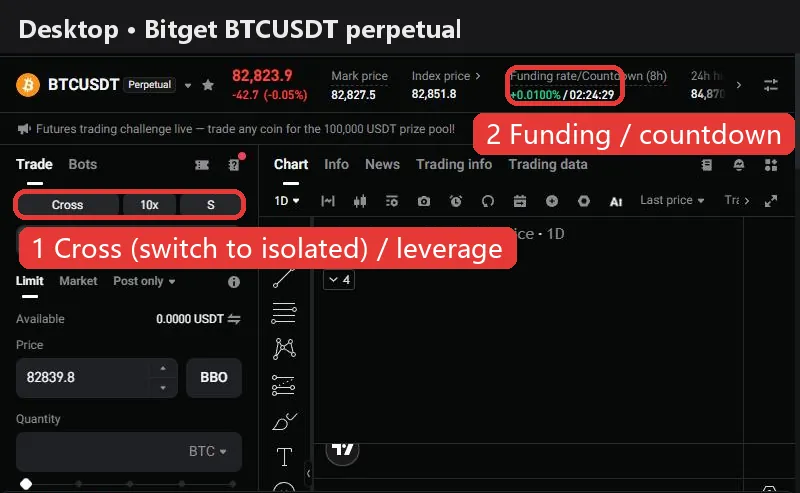
Work out the cost first. At Bitget's standard rates, opening and closing a 10,000 USDT position with market orders costs about 12.0 USDT in fees (0.060% taker × 2), or 4.0 USDT with limit orders that rest on the book. Holding also pays or receives funding at every settlement: BTC is at +0.0081% now, so a 10,000 USDT long pays about 0.81 USDT this period. The holding cost calculator shows where a position is cheapest to hold.
The higher the leverage, the smaller the move that liquidates you. Beginners usually start at 2–5x with isolated margin and a stop-loss.
Bitget vs other exchanges: fees and funding
| Exchange | Maker | Taker | BTC funding | ETH funding | Sign-up guide |
|---|---|---|---|---|---|
 Binance Binance | 0.020% | 0.050% | +0.0037% | +0.0014% | Guide |
 OKX OKX | 0.020% | 0.050% | +0.0100% | +0.0029% | Guide |
 Bybit Bybit | 0.020% | 0.055% | +0.0082% | +0.0019% | Guide |
 Bitget Bitget | 0.020% | 0.060% | +0.0081% | +0.0025% | This page |
 Gate Gate | 0.020% | 0.050% | +0.0076% | +0.0056% | Guide |
 HTX HTX | 0.020% | 0.060% | +0.0100% | +0.0100% | Guide |
Fees are each exchange's standard USDT perpetual rates (checked against official pages on 2026-10-09). Funding updates every 2 minutes; the superscript is the settlement interval (none means 8h). See the full comparison for every coin.
FAQ
Can I add a Bitget referral code after signing up?
Bitget's help center does not say so, and its own articles disagree. Enter it at sign-up; our button applies it automatically.
Can I use Bitget without KYC?
No deposits, trading or withdrawals. Bitget restricts unverified accounts, so verify before trading futures.
How long does Bitget KYC take?
Bitget says most reviews finish within an hour, often within minutes.
How many Bitget accounts can I have?
The terms allow 1 account per person, and identity verification applies to 1 main account.
What are Bitget's futures fees?
Standard users (VIP0) pay 0.02% maker and 0.06% taker on USDT-M futures. Opening and closing 10,000 USDT with market orders costs about 12 USDT.
I didn't get the Bitget verification code.
SMS can be resent every 120 seconds, up to 3 times. For email, check spam, whitelist Bitget's sender and wait 15 minutes.
Which countries can't use Bitget?
The terms list the US, Canada, France, Germany, Austria, Hong Kong, Japan, Singapore, Malaysia, Thailand, Russia and others. Check the latest terms before signing up.
Checked against Bitget's official help center on 2026-10-22. Buttons and promotions change; the sign-up page is the final word. Make sure Bitget is available and legal where you live, and never use someone else's ID or a false country of residence. Futures trading is high risk and you can lose all of your margin. Sources: Web sign-up, App sign-up, KYC guide, Terms of use, Futures transfer, Fees