How to sign up on Bybit: account, KYC and futures
Bybit takes an email, phone number, Google, Apple or Telegram and a few minutes. New accounts are Unified Trading Accounts, so deposited USDT works as futures margin without a transfer. This guide follows Bybit's help center and explains when referral code 120953 can and can't be added.
Before you start
- An email or phone number. Each can be linked to one account only.
- A valid ID of your own and a face check; Advanced verification adds a proof of address from the last 3 months.
- You must be 18+, and each person can verify one account.
- Check your country first. Bybit doesn't serve the US, mainland China, Hong Kong, Singapore, Canada, North Korea, Cuba, Iran and others (see the restricted countries page).
Step 1: open the sign-up page
Open the Bybit sign-up page, or install the app and tap Sign Up. Our button applies referral code 120953 automatically.
Trade on Bybit Referral code 120953
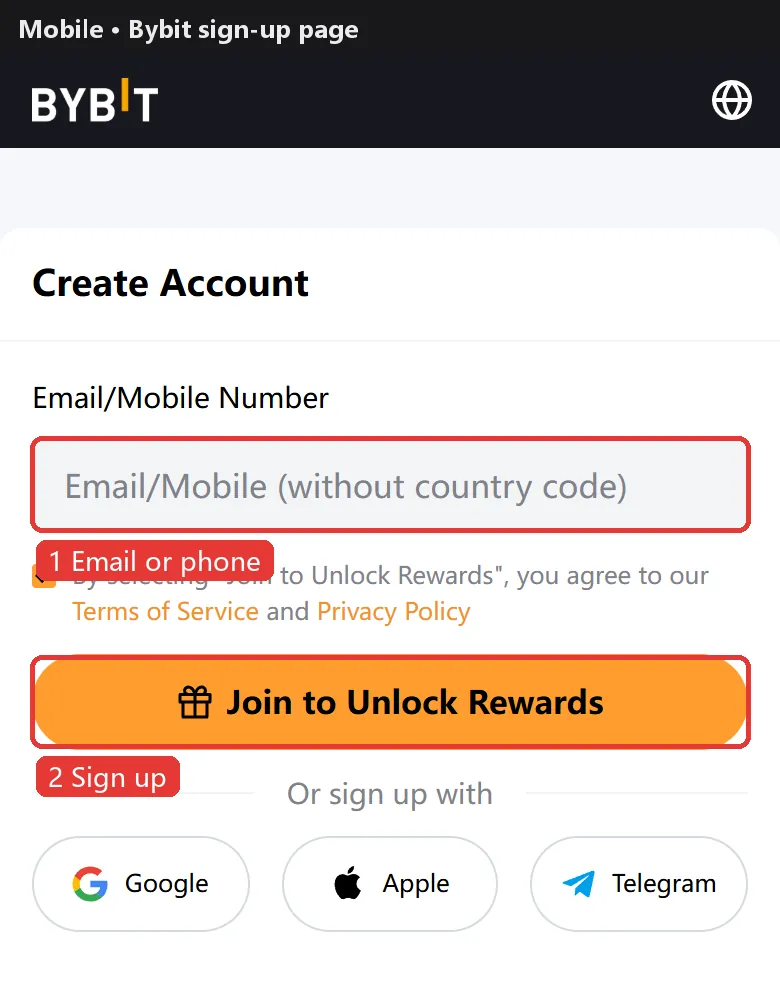
Step 2: enter email or phone, password and referral code
Enter your email or phone, or continue with Google, Apple or Telegram.
If the page shows Referral Code (Optional), make sure it reads 120953, or type it in.
Set a password of 8–30 characters with upper-case, lower-case letters and a number.
Adding a code later: Bybit says user-to-user referral codes can't be added or changed after sign-up, while an affiliate code can be added once within 14 days under Account Info → Join an Affiliate's Community (main account only, no code before). Easiest is to enter it now.
Step 3: enter the verification code
Pass the captcha, enter the email or SMS code and your account is ready.
No code? Check spam and whitelist Bybit's sender; for SMS check the number and country code, wait and resend.
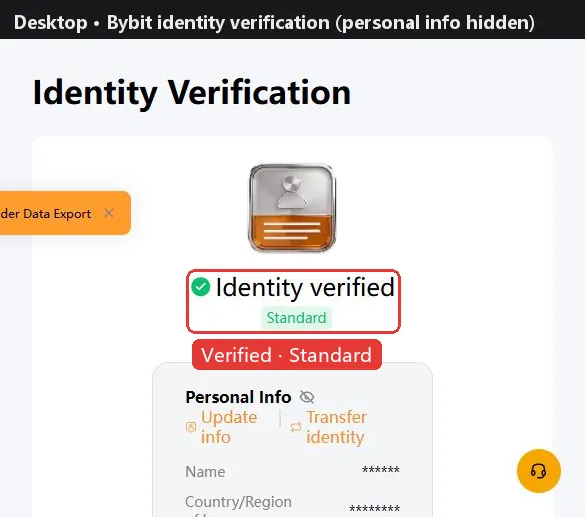
Step 4: verify your identity
Bybit has several verification levels. Unverified accounts can still withdraw small amounts (20,000 USDT a day, 100,000 a month), but many features and rewards need verification. Bybit says reviews usually take about 15 minutes and at most 48 hours.
| Level | What you need | What it unlocks |
|---|---|---|
| Unverified | — | Withdraw 20K USDT/day, 100K/month |
| Standard | ID + face check | Withdraw 1M USDT/day |
| Advanced | Proof of address (last 3 months) | Withdraw 2M USDT/day |
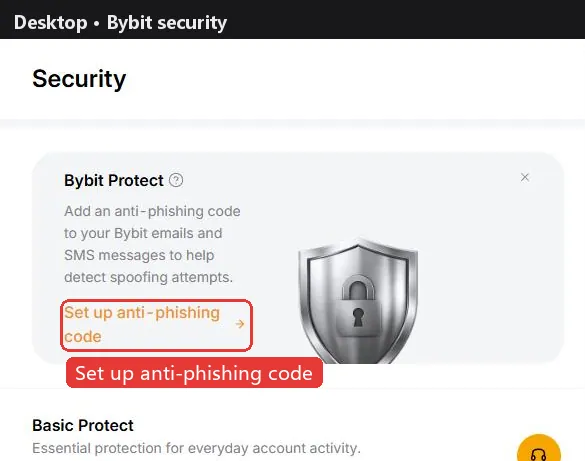
Step 5: secure your account
Under Account & Security turn on a passkey or Google Authenticator, set an anti-phishing code (it appears in real Bybit emails and SMS) and enable the withdrawal address whitelist. Changing your email pauses withdrawals and P2P for 24 hours and locks further changes for 7 days.
Step 6: deposit USDT
USDT perpetuals use USDT as margin. The usual way in is an on-chain transfer from another exchange or wallet: on Bybit tap Deposit, choose USDT and a network (such as TRC20, ERC20 or BEP20), copy the address, then send from the other side on the same network. A wrong network can mean lost funds, so try a small amount first.
Bybit also sells USDT by card or P2P, depending on your region.
Step 7: open futures and place a first order
- New users get a Unified Trading Account (UTA): deposited USDT is already futures margin, no transfer needed.
- Go to Trade → Derivatives → USDT Perpetual and pick a pair such as BTCUSDT.
- Regular users default to cross margin, so the whole account backs your positions; leverage is a 1–100x slider. Beginners usually stay low and switch to isolated when needed.
- Choose limit or market, enter the size and tap Buy/Long or Sell/Short. Check the funding rate and countdown first.
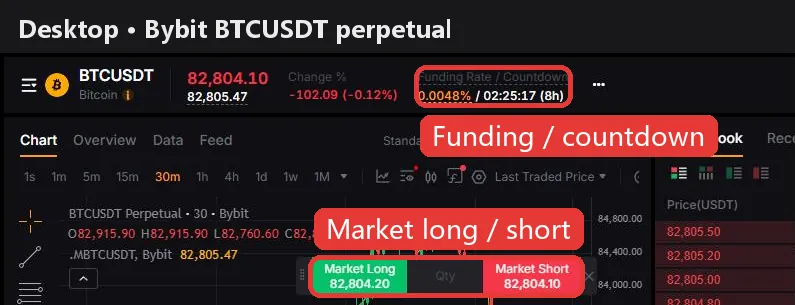
Work out the cost first. At Bybit's standard rates, opening and closing a 10,000 USDT position with market orders costs about 11.0 USDT in fees (0.055% taker × 2), or 4.0 USDT with limit orders that rest on the book. Holding also pays or receives funding at every settlement: BTC is at +0.0082% now, so a 10,000 USDT long pays about 0.82 USDT this period. The holding cost calculator shows where a position is cheapest to hold.
The higher the leverage, the smaller the move that liquidates you. Beginners usually start at 2–5x with isolated margin and a stop-loss.
Bybit vs other exchanges: fees and funding
| Exchange | Maker | Taker | BTC funding | ETH funding | Sign-up guide |
|---|---|---|---|---|---|
 Binance Binance | 0.020% | 0.050% | +0.0037% | +0.0014% | Guide |
 OKX OKX | 0.020% | 0.050% | +0.0100% | +0.0029% | Guide |
 Bybit Bybit | 0.020% | 0.055% | +0.0082% | +0.0019% | This page |
 Bitget Bitget | 0.020% | 0.060% | +0.0081% | +0.0025% | Guide |
 Gate Gate | 0.020% | 0.050% | +0.0076% | +0.0056% | Guide |
 HTX HTX | 0.020% | 0.060% | +0.0100% | +0.0100% | Guide |
Fees are each exchange's standard USDT perpetual rates (checked against official pages on 2026-10-09). Funding updates every 2 minutes; the superscript is the settlement interval (none means 8h). See the full comparison for every coin.
FAQ
Can I add a Bybit referral code after signing up?
User-to-user referral codes can't be added or changed. An affiliate code can be added once within 14 days under Account Info → Join an Affiliate's Community (main account, no earlier code). Our code is 120953 and the button applies it.
Can I sign up for Bybit from mainland China?
No. Bybit's restricted list includes mainland China, as well as Hong Kong, the US, Singapore, Canada and others.
Can I use Bybit without KYC?
You can sign up and withdraw small amounts (20,000 USDT a day, 100,000 a month), but many features and new-user rewards need verification.
How long does Bybit KYC take?
Bybit says about 15 minutes in most cases and up to 48 hours.
Do I need to transfer funds for Bybit futures?
Not with the default Unified Trading Account: deposited USDT is already margin.
What are Bybit futures fees?
VIP0 users pay 0.02% maker and 0.055% taker on perpetuals. Opening and closing 10,000 USDT with market orders costs about 11 USDT.
How many Bybit accounts can I have?
Each email or phone links to one account, and each person can verify one account.
Checked against Bybit's official help center on 2026-10-22. Buttons and promotions change; the sign-up page is the final word. Make sure Bybit is available and legal where you live, and never use someone else's ID or a false country of residence. Futures trading is high risk and you can lose all of your margin. Sources: Register an account, Add an affiliate code, KYC FAQ, KYC levels, Restricted countries, Fees