How to sign up on OKX: account, KYC and futures
OKX asks for your <b>country of residence first</b>, needs <b>both an email and a phone number</b>, and only accepts a referral code during sign-up. New accounts start in Spot mode, so you must switch the account mode before trading USDT perpetuals. This guide follows OKX's help center step by step.
Before you start
- An email address and a phone number: OKX requires both, and each can register only one account.
- A valid government ID of your own (passport, ID card, driver's licence; no screenshots) and a selfie; sometimes a proof of address from the last 3 months.
- You must be 18+, and each person may hold one verified account.
- Choose your real country. The first screen asks where you usually live, not your nationality. If it isn't listed, OKX doesn't serve it; don't pick another country. See the risk and compliance disclosure for restricted regions (including the US, Canada, Hong Kong, Japan, Malaysia and India). Some regions are served by local OKX entities instead.
Step 1: open the sign-up page
Open the OKX sign-up page (Sign up at the top right, or the OKX app). Our button applies the referral code automatically.
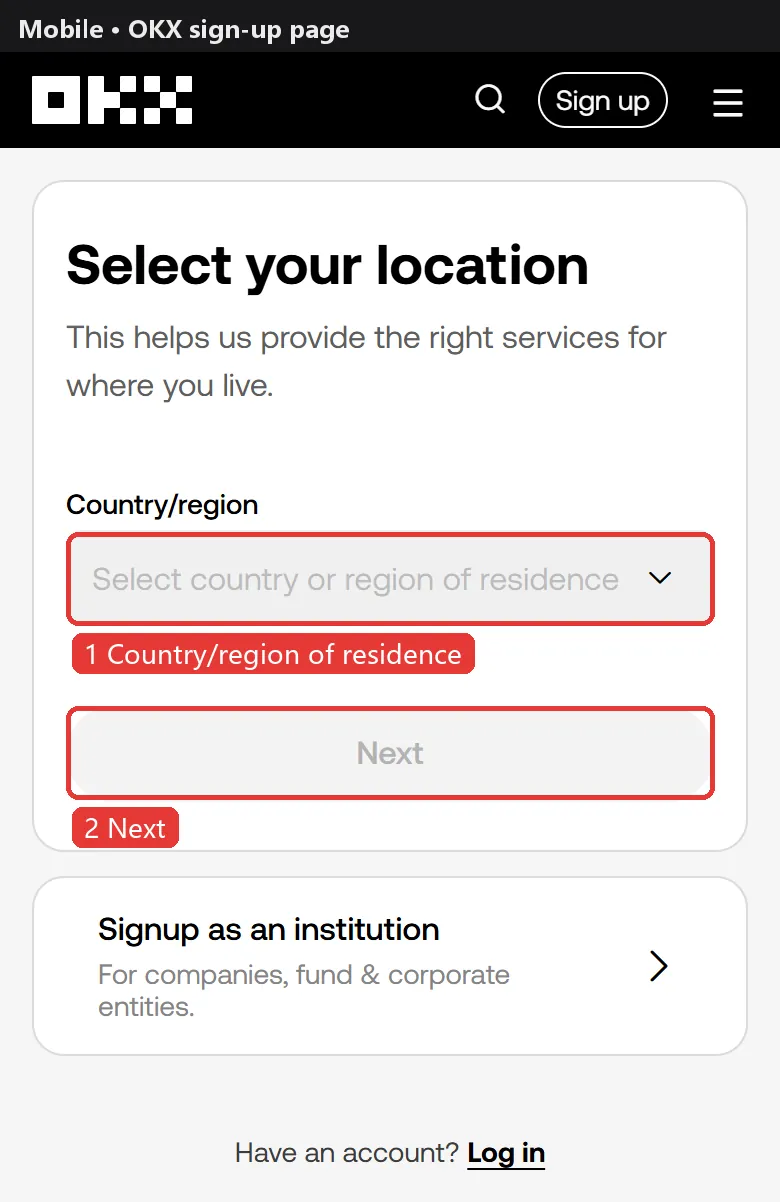
Step 2: choose your country, enter email and referral code
Select your country/region of residence, accept the terms of service, risk and compliance disclosure and privacy notice, and tap Create account.
Enter your email and make sure the referral code field is filled (a referral link fills it in). OKX says a referral code can't be added or changed once the account exists, with no grace period, so check it now.
Tap Sign up.
Step 3: enter the verification code
Enter the 6-digit email code (valid for 10 minutes), then your phone number with the right country code, tap Verify now and enter the 6-digit SMS code.
Finally set a password of 8–32 characters with at least one upper-case letter, lower-case letter, number and symbol.
No code? For SMS clear the cache, restart the phone and check blocking apps; for email check spam and whitelist OKX's sender. You can also tap Unable to verify and use voice, Telegram or WhatsApp. Six wrong entries lock the account.
Step 4: verify your identity
Without verification OKX blocks trading, deposits, withdrawals and transfers. Enter your basic details (residence, nationality, name, date of birth, ID number, address), upload your ID, take a selfie and add proof of address if asked.
OKX says results usually arrive in about 30 seconds, or up to 24 hours if a manual review is needed. One ID can be linked to one account.
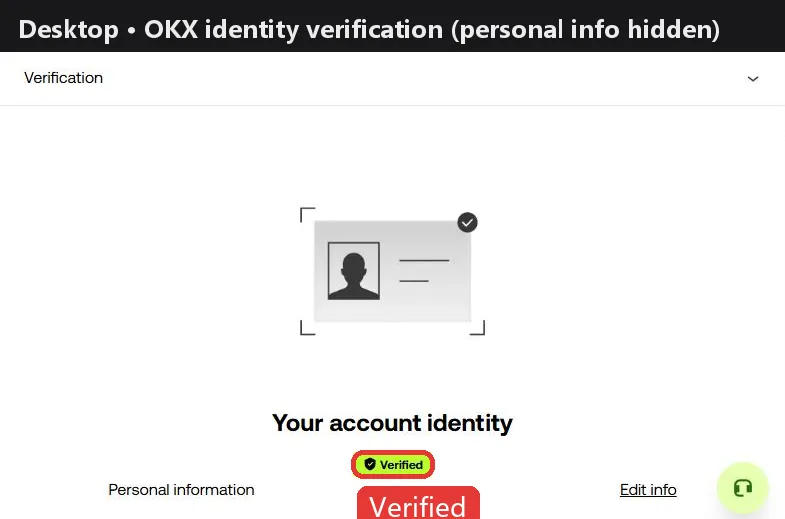
Step 5: secure your account
In Security link an authenticator app (such as Google Authenticator) and a passkey, set an anti-phishing code under Advanced Security, and turn on the withdrawal allowlist in the address book, optionally with a 24-hour lock on new addresses.
Changing your password, phone, email or authenticator blocks withdrawals and P2P selling for 24 hours, and OKX can't lift it early.
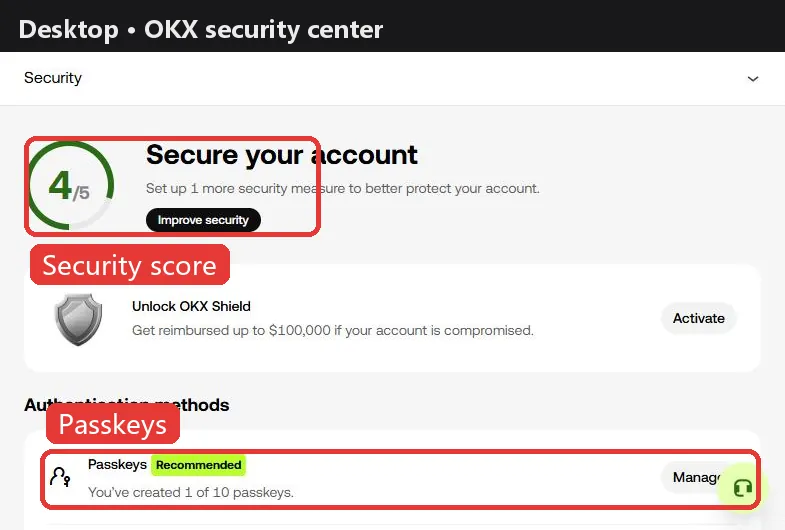
Step 6: deposit USDT
USDT perpetuals use USDT as margin. The usual way in is an on-chain transfer from another exchange or wallet: on OKX tap Deposit, choose USDT and a network (such as TRC20, ERC20 or BEP20), copy the address, then send from the other side on the same network. A wrong network can mean lost funds, so try a small amount first.
OKX also sells USDT by P2P or card, depending on your region. Deposits land in the Funding account.
Step 7: open futures and place a first order
- New users start in Spot mode, which only trades spot. Go to Settings → Account mode and switch to Spot and futures mode to trade perpetuals; some accounts are asked to pass a short quiz first. You can't switch with open orders or positions.
- Under Assets → Transfer move USDT from the Funding account to the Trading account.
- Open Trade → Futures, pick a USDT-margined perpetual such as BTCUSDT Perp, choose isolated or cross and set leverage (up to 100x; you can set your own cap). Beginners usually use isolated and low leverage.
- Choose limit or market, enter the size and tap Long or Short. Check the funding rate and countdown first.
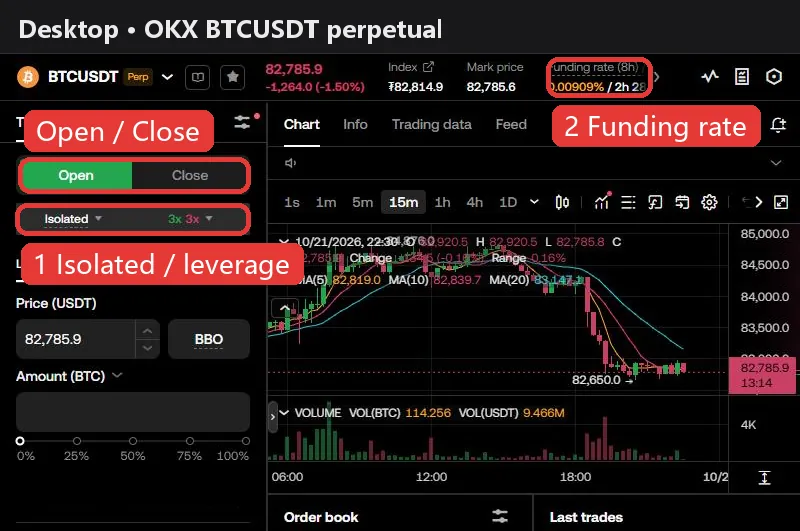
Work out the cost first. At OKX's standard rates, opening and closing a 10,000 USDT position with market orders costs about 10.0 USDT in fees (0.050% taker × 2), or 4.0 USDT with limit orders that rest on the book. Holding also pays or receives funding at every settlement: BTC is at +0.0100% now, so a 10,000 USDT long pays about 1.00 USDT this period. The holding cost calculator shows where a position is cheapest to hold.
The higher the leverage, the smaller the move that liquidates you. Beginners usually start at 2–5x with isolated margin and a stop-loss.
OKX vs other exchanges: fees and funding
| Exchange | Maker | Taker | BTC funding | ETH funding | Sign-up guide |
|---|---|---|---|---|---|
 Binance Binance | 0.020% | 0.050% | +0.0036% | +0.0013% | Guide |
 OKX OKX | 0.020% | 0.050% | +0.0100% | +0.0027% | This page |
 Bybit Bybit | 0.020% | 0.055% | +0.0082% | +0.0018% | Guide |
 Bitget Bitget | 0.020% | 0.060% | +0.0080% | +0.0026% | Guide |
 Gate Gate | 0.020% | 0.050% | +0.0076% | +0.0057% | Guide |
 HTX HTX | 0.020% | 0.060% | +0.0100% | +0.0100% | Guide |
Fees are each exchange's standard USDT perpetual rates (checked against official pages on 2026-10-09). Funding updates every 2 minutes; the superscript is the settlement interval (none means 8h). See the full comparison for every coin.
FAQ
Can I add an OKX referral code after signing up?
No. OKX says a referral code can't be added or changed after the account is created, with no grace period. A referral link fills it in; just check the field during sign-up.
Does OKX need both an email and a phone number?
Yes. The registration guide requires both, and each email or phone number can register only one account.
Can I use OKX without KYC?
No trading, deposits, withdrawals or transfers. Verify before trading futures.
How long does OKX verification take?
About 30 seconds after upload, or up to 24 hours with a manual review.
Why can't I trade futures on my new OKX account?
New accounts are in Spot mode. Switch to Spot and futures mode under Settings → Account mode.
What are OKX futures fees?
Regular users pay 0.02% maker and 0.05% taker on futures; some contracts have their own fee group, so check My fees. Opening and closing 10,000 USDT with market orders costs about 10 USDT.
Why can't I withdraw after changing my phone number?
OKX blocks withdrawals and P2P selling for 24 hours after changing your password, phone, email or authenticator, and the lock can't be lifted early.
Checked against OKX's official help center on 2026-10-22. Buttons and promotions change; the sign-up page is the final word. Make sure OKX is available and legal where you live, and never use someone else's ID or a false country of residence. Futures trading is high risk and you can lose all of your margin. Sources: Registration guide, How to register, Referral program, Identity verification, Account modes, Trade perpetuals, Risk and compliance disclosure